Antinuke
Impose restrictions on moderators to prevent destructive behavior.
Why use an antinuke system?
It’s important to have an antinuke system in place to prevent moderators from abusing their permissions. This is a security measure which lets your server stay safe from any harmful actions.
How does the antinuke work?
The antinuke will set a limit on the number of actions a moderator can perform in a certain time frame. If the limit is exceeded, the moderator will be punished and a message will be sent to the owner.
Configuration
Allowing users to configure the antinuke
Initially, only the server owner can configure the antinuke. However, you can
allow other users to configure the antinuke with the ,antinuke admin command.
,antinuke admin (user)
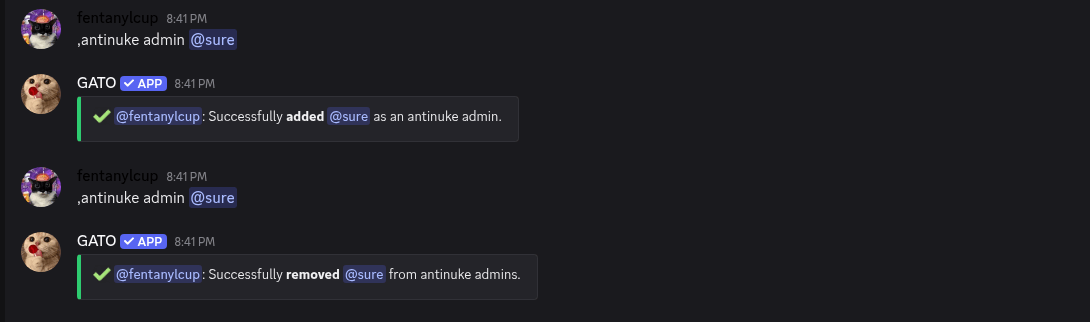
To show all antinukes admins, use the ,antinuke admins command.
Exempting users from the antinuke
Note:
This is a dangerous command and will allow the user to bypass the antinuke entirely.
You can exempt users from the antinuke with the ,antinuke whitelist command.
,antinuke whitelist (user)
You can always look for the whole list of whitelisted users with
the ,antinuke whitelisted command.
Settings
To ensure the antinuke system works properly, you need to configure the flags related to the `,antinuke modules.
Available Modules
Disable Antinuke
If you want to disable any antinuke module, you can use the ,antinuke (module) off command.
,antinuke (module) off
View Antinuke's settings
If you want to view antinuke's settings, you can use the ,antinuke status command.
,antinuke status
Antinuke Permissions
To ensure the secruity of the server, antinuke admins need permissions to be assigned through
the ,antinuke permissions command. List of the permissions:
administratorban_membersmention_everyonekick_membersmoderate_membersmanage_guildmanage_channelsmanage_rolesview_audit_logmanage_webhooksmanage_expressionsmanage_nicknames